Graphing Calculator: Graphing Rational Functions
By S Taylor
Graphing rational functions on the calculator requires you to change the mode setting, be familiar with graphing functions, and set the window. If you need help with any of these topics, click on the link to review them before continuing with this lesson. Example #1: Graph
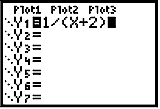
Change the mode from connected to dot and enter the function in the Y= screen.
Make sure to put the denominator in parentheses.
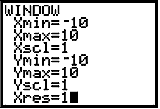
Set the calculator to graph in a standard viewing window by usingor by inputting the window setting by hand.
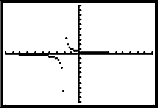
Obtain the graph by pressing thekey.
Notice that there is a vertical asymptote atand that the x-axis is a horizontal asymptote. To learn more about asymptotes click here to go to the graphing rational functions lesson.


Example #2: Graph  .
.
Depending on the model of your calculator, you may need to reset the dot mode on the calculator. You can do this without going back to the mode setting. If you use the
key to move the cursor to the left of Y= and press
six times. This will reset the calculator to dot mode. Now move the cursor back to the right of the Y= and enter the function.
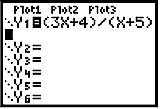
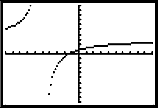
For this function you will need to make sure you use parentheses around both the numerator and the denominator when you enter it into the calculator.
Notice that there is a vertical asymptote atand a horizontal asymptote at
.

Example #3: Graph  .
.
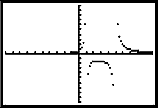
This graph will have two vertical asymptotes, one at
and
. Note if you factor the denominator the factors will be (x - 1)(x - 5). The horizontal asymptote will be the x-axis.
Advertisement