Determinants
By S Taylor
The determinant of a matrix is simply a number that describes that matrix. Only square matrices can have a determinant.
One of the original uses of a determinant of a matrix had to do with solving a system of linear equations. Once the determinant of a matrix had been calculated, that number could be used to help quickly compute the solution to a system of equations. Since that time other applications of determinants have come into play. Some of these include finding the area of a triangle (and by extension, area of triangular regions of land), whether points are collinear, and when working with cross products.
First we will look at calculating a determinant by hand for a

matrix and for a

matrix. Calculating determinants of higher order square matrices is more complicated, so we will only focus on these two types of matrices.
Calculating the determinant of a
 matrix
Calculating the determinant of aSuppose you have matrix
. To find the determinant, you simply take
. The notation for the determinant of matrix A can either be
or det(A). In the examples below, both notations will be used.
- If
find the determinant of A.
Using the formula
and applying it to this matrix gives
- If
find the determinant of B.
Again, applying the formula
will give
- If
find the determinant of C.
In this case we have
Notice that we were able to compute determinants that were positive, negative, and zero. It is important to note that while it is possible to obtain a determinant value of zero, there are other implications that arise. A determinant of zero leads to problems in finding an inverse of a matrix and in finding a solution to a system of equations. So while it is mathematically possible to compute a determinant of zero, be aware that is a situation which will cause complications in other computations.






 matrix
 The determinant of a
matrix is found by “reducing” it to a series of
matrices.
Let’s look at
.
We’re going to create three different
matrices and find their determinants.
First consider element a in the matrix. If we eliminate the column and row that a appears in, we are left with a matrix that is
and its determinant is
. We then take that value and multiply it by a. This gives us our first term in computing the determinant of A.
- For now, let’s call this value p = a(ei - fh).
Let’s move on to our second computation. If we consider the element b in the matrix and eliminate its row and column, we are left with a matrix of
. The determinant of that matrix is
. We then multiply that value by b and get the second term in computing the determinant of A.
- Let’s call this value q = b(di - fg).
Our third, and last, computation comes from considering element c and removing the row and column it appears in to get
which has a determinant of
. As before, we’ll multiply that value by c to get the last term in our computation of the determinant of A.
- We’ll call it r = c(dh - eg).
However, it’s not just enough to compute p, q, and r. To finally obtain
or det(A) we have to add and subtract those in just the right order:

= det(A)
= + (p) - (q) + (r)
You may be thinking that you can never remember all of this. Notice that you weren’t given a formula for this process, but a series of steps to follow. Once you start working through the repetitive process, you won’t be quite so intimidated by all the steps.
- If
find the determinant of D.
We’ll start by eliminating the row and column associated with 1.
The
matrix that remains will be
which has a determinant of.
When we multiply -1 by 1, we get -1.Now eliminate the row and column associated with the 2.
This leaves
and
its determinant of.
Multiply -5 by 2 and you have -10.Next, eliminate the row and column associated with the -1.
This leaves
and
its determinant of.
Multiply 4 by -1 to come up with -4.Finally, take each of the three values you computed to find the answer.
= det(D) = + (-1) - (-10) + (- 4) = -1 +10 - 4 = 5
It should be pointed out that this process of using the smaller matrices from a matrix can be done somewhat differently but with the same results. Some books will emphasize an alternative strategy to save steps if it is possible to do so. Rather than learn a variety of methods that may save one step along the way, it is usually best to find one method and stick with it. Because there are so many little steps and so many places to make arithmetic errors, the more automated you can make the task, the more likely you are to find the correct answer without making mistakes.
- If
find the determinant of E.
We will follow the same process as we did in Example 4.
Start with the 2, eliminate its row and column,
leaving the matrix
which has
a determinant of
Then multiply 15 by 2 to get 30.Our next step is to eliminate the row and column associated with the 0 and find the determinant of the resulting
matrix. But remember that once we find its determinant,
we’ll multiply it by 0 which will always give 0.So be aware that if you have a zero in the top row of your matrix, you can save yourself one of the determinant combinations because the final result will always be 0.
We now need to eliminate the column and row associated with 1.
This gives us the matrix
which has
a determinant of
Multiply -12 by 1 and we have -12.Finally use our three values (remember the second value was 0) and get
= det(E) = + (30) - (0) + (-12) = 30 - 12 = 18






Using the calculator to compute determinants
Using the calculator to computer determinants requires that you be able to input a matrix into the calculator. If you help doing this, click here. Let’s re-visit each of the matrices we did in the previous examples and verify that our hand computations were done correctly.
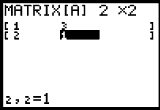
This matrix input in the calculator looks like
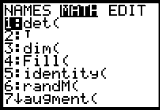
To obtain the determinant, go to your matrix menu and then choose the MATH menu. The determinant is the first option on that screen.
When you press
, the determinant command will appear on your home screen and is waiting for you to tell it which matrix you want to find the determinant of.
Go back to your matrix screen and choose the name of the matrix you want to find the determinant of and it will be pasted into your home screen.
When you press
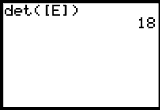
now, the calculator will give you the determinant of matrix A.











Directions and/or Common Information:
Find the determinant of each matrix below (if possible). You should also check your answer on the calculator.




Advertisement